Friday, 31 May 2013

4th Lecture

.OOPs - Object Oriented Programming Structure.
>OOPs is a new programming technique which emphasizes on security and reusability. It is an approach to analyse problems and developing solution in form of objects. OOPs is
all about classes and objects.
>class- a class is a user defines data type or a template. It is used to group data of different types and functions to operate on data. Class defines shape and behaviour
of objects. once a class is defined , we can create any number of objects.
>object- is an instance of class. an objct is a collection of properties and members . A property stores data for an object and method performs action on stored data.
>input,Store,Process And ouptput
>Variable- A variable stores single vlaue.
>structure we can group data of different type.
>there are five principles of OOPs
.encapulation-
process of wrapping up data and function as a single unit.
.polymorphism-
.data hiding-
protecting data from outside world by making it private.
.inheritence-
ceating new class from existing class.Existing class is known as base parent or super and new class is knoqwn as sub\drive\child class. A suvb class can
use base class's code. change existing code (if allowed) and add up new code
c# supports single multilevel inheritence.
.abstraction-
hidng unessential details and exposing out essential details.
using systems.windows.Forms;
class DAV:Form
{
}
class s
{
s}tatic void main()
{
DAV obj=new DAV();
obj.showDialoge();
}
}

Thursday, 30 May 2013

3rd Lecture

.Arithmetic Data Types
.A datatype specifies that what kind of value a variable can store and what are valid operations for declared variable.Datatype reserve memory for variable.
.Data Type Size(Bytes) Conversion
Byte 1 Convert.ToByte (+)
Short 2 Convert.ToInt16 (+/-)
UShort 2 Convert.ToUInt16 (+)
Int 4 Convert.ToInt32 (+/-)
UInt 4 Convert.ToUInt32 (+)
Long 8 Convert.ToInt64 (+/-)
ULong 8 Convert.ToUInt64 (+)
Float 4 Convert.ToSingle Decimal value
Double 8 Convert.ToDouble Double
Precision
Decimal value
char 2 Convert.Tochar
String 2Bytes Convert.Tostring
per character
DataTime 8 Convert.ToDataTime
SByte 2 Convert.ToSByte (+/-)
.There are two types of Datatypes
.Value Type
.Reference Type
List Box:-this control is used to provide a scrollable list of options. User can select single or multiple items.
Select list box> Properties > Items(Collection).
ComboBox:- Defines a drop down list of options. User can select only one item from the combobox. It can be used for selection as well as for typing.
Assignment:-
form 1
.only close with title login
.user id textbox
.password textbox Password Does't Appear to the user. For this choose properties Either passwordchar(for showing character) or usesystemPasswordchar
(for boolean properties).
.button named cancel
.button named Sign In
.if user id and password are wrong than there should be a message contains a title and only 'ok' button otherwise there should be a main form again which contains
4 buttons
>first button named click to open the form list
>second button named comboBox to open form comboBox
>third button named COPY to Open a form containing a list box on left side and one on the left side containing names of cricket teams and in middle there should be 2 buttons
and when be select upper button than the item from the left box move to the right box and maximum items on right side should be 4 and second button for from right to left
and if we want to store more than 4 items than there should be a error message.
>Fourth Button is close button containing a confirmation form either to close or not.
Form 2
on example of list box
.if on clicking bbutton there is nothing written in the text box than there should be a proper message.
.if on clicking delete there is nothing selected than display a appropriate message.
.if delete on all delete button than there should be a confirmation boxwhich ask whether to delegte or not.
Form 3
.a combobox contains name of colleges
.a list box
.when we select a college than list box contains the students of that college
properties of combobox
.dropdown style

Wednesday, 29 May 2013

2nd Lecture

Assignment.
create a form having
.only close button
.proper title
for first app
.4 buttons on the form
.first button is name to display name in message box
.college name
.city
.exit
second form
.4 buttons
.every button change the color of form according to the name of the form
third form
.form to cube
fourth form
.radio buttons with color names
.2 buttons
.one for exit and another is to change
fifth form(format)
.value text box
.result text box
.radio button cube radio button sqr
.compute button exit button
sixth form
.to add two numbers
seventh form
.value text
.value text
.res text
.radio buttons add sub mul div
.2 buttons compute and exit

Tuesday, 28 May 2013

1st Lecture

4logoc.jpg
.net - a framework software development platform to develop high scale application consist of 2 components
BCL stands for Base Class Library. It is collection of classes which use to develop applicwation.
CLR stands for Common Lnaguage Runtime.It is an engine which execyte the application made by BCL.
using .net framework we can create diff types of APPS.
like Console apps windows\desktop web applications\sites windows services mobile applications
Windows applications or desktop applications
when u have opnd vsl stdo edtr
to crte app
.click file new project
.select language
.type of appplication
.click ok
to run app form press f5 or run button.
open toolbox step cntrl+alt+x\icon with hammer
this means form
for design window click design button
.this.close(); means form close
.this.BackColor=Color."ColorName" to change color
.MessageBox.Show("Any Message"); to display any message
.diff visual elements are known as controls
.int a=Convert.Toint32(textbox1.text;
int b=a*a*a;
textBox2.text=Convert.ToString(b);
to convert a string to int and an int to string
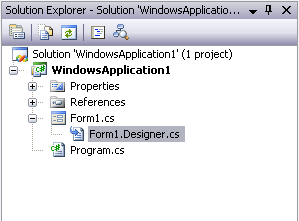
steps to add a new form in current app
.open solution explorer ctrl+alt+l
.in solution explorer right click application
.add>select window form
how to change
.open solution explorer>open Program.cs file>change name of form
form
application to add two numbers
"label is used to showsome descriptive text"
int a=Convert.toint32(textbox1.text);
int b=convert.toint32(textbox2.text);
int sum=a+b;
textbox3.text=convert.tostring(sum);
this.close();
how to change forms title
.select form>open properties click f4>change text properties
text
maximise
form border size
click on the thing whose properties u want to change
radio button coding
if(radioButton1.Checked==true)
{
Messagebox.Show("text");
}
else if(radioButton2.Checked==true)
{
MessageBox.Show("text");
}

Monday, 27 May 2013

Course Module

Industrial Training in Dot Net is a modular 6 weeks course, regularized over 5 days a week, 2 hrs a day, and exclusively includes practical sessions. The course curriculum of Industrial Training in .Net comprises:
  • Microsoft 3.5,4.0,4.5 Framework
  • C#
  • OOPS
  • Introduction to ASP.NET
  • database management
  • Mysql